

Alm Share
Send anything, between everything.
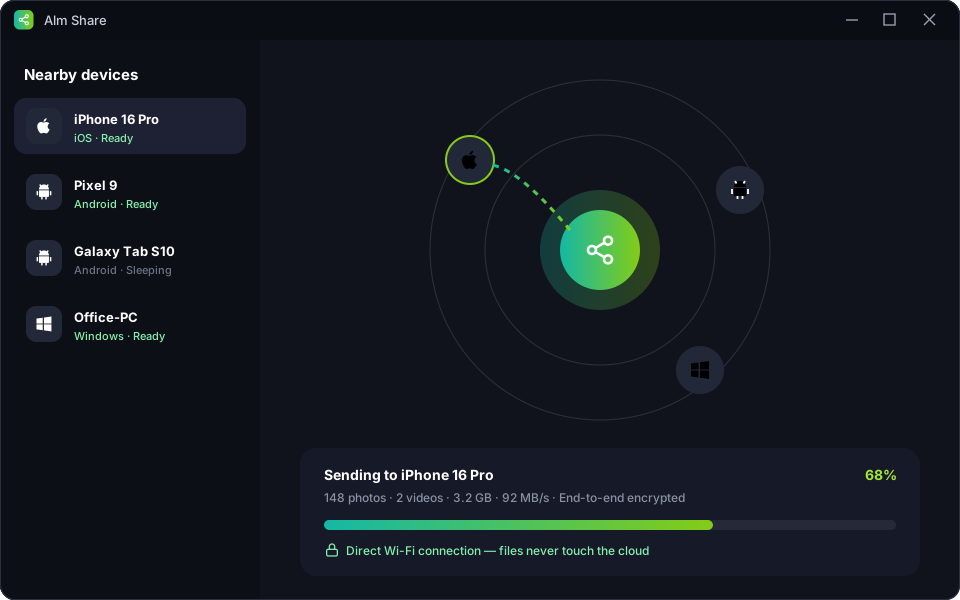
A premium cross-platform file transfer app that moves photos, videos and files between Windows PC, iPhone and Android — directly and encrypted.
What Alm Share offers
Alm Share connects your Windows PC, iPhone and Android devices over your local network for lightning-fast transfers — no cables, no cloud uploads and no file size limits. Transfers travel directly from device to device with end-to-end encryption. Send whole folders, share clipboard text, and even move files across the internet with a one-time encrypted link when devices are not on the same Wi-Fi.
Feature breakdown
Truly cross-platform
Windows ⇄ iPhone ⇄ Android in any direction, with one consistent app.
Wi-Fi Direct speed
Transfer at full local network speed — gigabytes in minutes, with no size limit.
End-to-end encrypted
Every transfer is encrypted on the sending device and decrypted only on the receiver.
Folders & batches
Send whole folders and hundreds of files in a single, resumable transfer.
Shared clipboard
Copy on your phone, paste on your PC — text, links and images.
Remote send links
Not on the same network? Share an expiring, encrypted link instead.
See it in action
Click a screen to enlarge it.
Specifications
- Platforms
- Windows 10/11 · Android 8+ · iOS 15+
- Speed
- Up to full Wi-Fi / LAN speed
- File limit
- None
- Licence
- Premium · free tier available
Questions
Do my files go through a server?
No. On the same network, files travel directly between devices. Remote links are end-to-end encrypted.
Does it work without internet?
Yes — devices only need to share a local network or hotspot.
Is there a file size limit?
No limits on Premium. The free tier allows files up to 2 GB.
Get Alm Share
Leave your email and we'll send you the download link and launch offers for Alm Share. We only email about this app.
Reviews
Loading reviews…
Sign in or create an account to leave a review.
Please verify your email address before posting a review. This keeps reviews genuine.
More from Alm Creatives
 Productivity
Alm Download Manager
A premium Windows download manager that splits files into parallel streams, resumes anything, and never phones home.
 Photo editing
Alm Pixel
A powerful Android photo editor with RAW support, pro-grade adjustments and on-device AI — your photos never leave your phone.
 Video editing
Alm Vision
A multi-track Android video editor with 4K export, keyframes, transitions and captions — and no watermark in premium.