

Alm Pixel
Pro photo editing in your pocket.
A powerful Android photo editor with RAW support, pro-grade adjustments and on-device AI — your photos never leave your phone.
What Alm Pixel offers
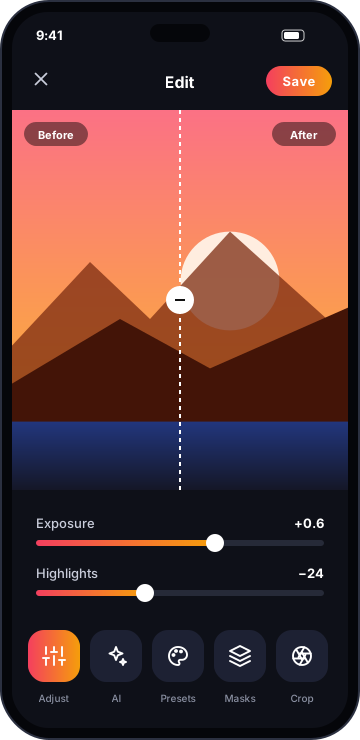
Alm Pixel brings desktop-class photo editing to Android. Shape light with curves, HSL and selective masks, retouch skin and remove objects with on-device AI, and finish with film-inspired presets. Every edit is non-destructive, so you can go back at any time. All processing — including AI tools — happens on your device, so your photos are never uploaded to a cloud server you do not control.
Feature breakdown
Pro adjustments
Exposure, curves, HSL, white balance, grain and more with precise, non-destructive controls.
On-device AI
Object removal, sky replacement and portrait relighting that run entirely on your phone.
RAW support
Open DNG and RAW files from your camera or phone and get every bit of detail.
Layers & masks
Brush, radial and linear masks with layer blending for selective edits.
Presets & filters
120+ handcrafted presets, plus save and share your own looks.
Private vault
Hide sensitive photos in an encrypted, PIN-locked vault inside the app.
See it in action
Click a screen to enlarge it.
Specifications
- Platform
- Android 9 and later
- Size
- ≈ 45 MB
- Formats
- JPG, PNG, HEIC, WebP, DNG/RAW
- Licence
- Free core · Premium unlock
Questions
Are my photos uploaded anywhere?
No. All editing, including AI features, runs on your device.
Can I undo an edit later?
Yes. Edits are non-destructive and stored as a recipe alongside the original.
Does it support RAW?
Yes — DNG and most camera RAW formats are supported.
Get Alm Pixel
Leave your email and we'll send you the download link and launch offers for Alm Pixel. We only email about this app.
Reviews
Loading reviews…
Sign in or create an account to leave a review.
Please verify your email address before posting a review. This keeps reviews genuine.
More from Alm Creatives
 Productivity
Alm Download Manager
A premium Windows download manager that splits files into parallel streams, resumes anything, and never phones home.
 Video editing
Alm Vision
A multi-track Android video editor with 4K export, keyframes, transitions and captions — and no watermark in premium.
 Music player
Alm Beats
A premium offline music player for Android with hi-res audio, a 10-band equaliser and gorgeous, ad-free design.