
Alm Docx
Every document, handled.
A complete PDF and document suite for Windows and Android — view, edit, sign, convert and protect files offline.
What Alm Docx offers
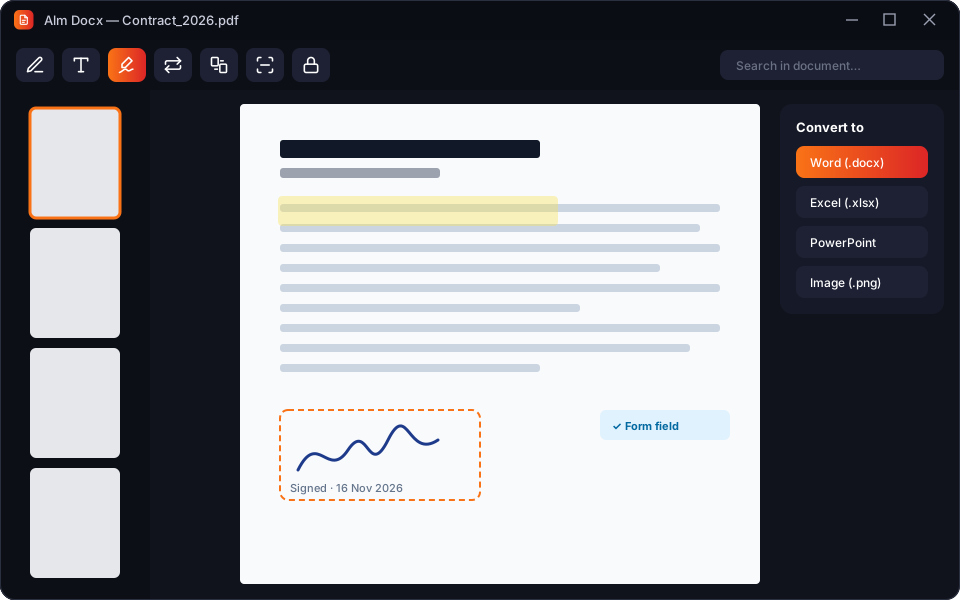
Alm Docx is a fast, offline document workspace. Read and annotate PDFs, edit text and images directly in the page, fill and sign forms, merge and split files, and convert between PDF, Word, Excel, PowerPoint and images. Built-in OCR turns scans into searchable text, and AES-256 password protection keeps sensitive files safe. Your documents are processed locally — never uploaded to a conversion server.
Feature breakdown
Edit PDFs directly
Change text, images and links inside any PDF as easily as in a word processor.
Fill & sign
Fill forms and add legally binding e-signatures on desktop or phone.
Convert anything
PDF ⇄ Word, Excel, PowerPoint, images and more — offline, with layout preserved.
OCR & scanner
Scan paper with your phone camera and make it searchable with on-device OCR.
Organise pages
Merge, split, rotate, reorder, compress and watermark documents.
Protect & redact
AES-256 passwords, permissions and permanent redaction of sensitive info.
See it in action
Click a screen to enlarge it.
Specifications
- Platforms
- Windows 10/11 · Android 8+
- Formats
- PDF, DOCX, XLSX, PPTX, TXT, images
- OCR
- 40+ languages
- Licence
- Free reader · Premium editor
Questions
Does conversion need internet?
No. All conversion and OCR is done on your device.
Are e-signatures legally valid?
Alm Docx signatures meet common e-signature standards in most regions.
Can I open Word files?
Yes — view and edit DOCX, and convert to and from PDF.
Get Alm Docx
Leave your email and we'll send you the download link and launch offers for Alm Docx. We only email about this app.
Reviews
Loading reviews…
Sign in or create an account to leave a review.
Please verify your email address before posting a review. This keeps reviews genuine.
More from Alm Creatives
 Productivity
Alm Download Manager
A premium Windows download manager that splits files into parallel streams, resumes anything, and never phones home.
 Photo editing
Alm Pixel
A powerful Android photo editor with RAW support, pro-grade adjustments and on-device AI — your photos never leave your phone.
 Video editing
Alm Vision
A multi-track Android video editor with 4K export, keyframes, transitions and captions — and no watermark in premium.